This doc is for Fanar V8 and earlier.
Fanar alerts can notify you when your Scheduled Queries match some arbitrary criteria. Use them to monitor business data or integrated them with tools like Zapier or IFTTT to trigger business processes like user onbarding or support tickets. While Alerts are usually combined with scheduled queries, the Alert criteria will be evaluated every time the query is executed.
A query schedule is not mandatory but is highly recommended for alerts. If you configure an Alert without a query schedule you will only receive notifications if a user in your organization manually executes the given query.
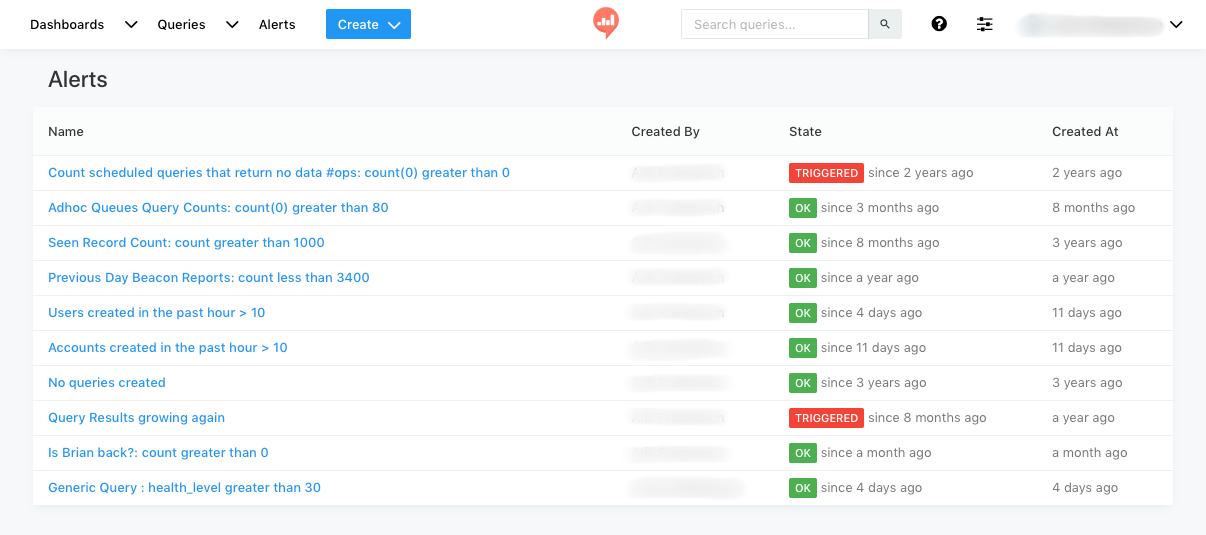
Click Alerts on the main navigation menu to see a list of the existing Alerts.
Usage
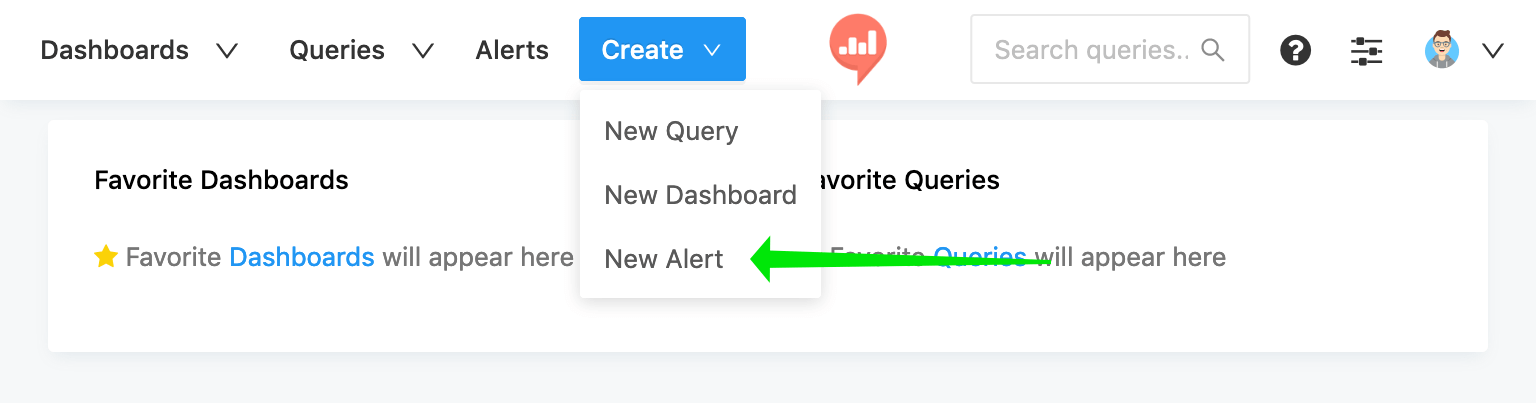
Create a new Alert by clicking the blue Create button in the navigation menu and selecting Alert.
Find the query that you would like to monitor using the search bar. Keep in mind that Alerts do not work with queries that use parameters.

If you set an Alert for a query that returns more than one row of data, the Alert will only read the first row of data.
Use the settings panel to configure your alert:

- Value Column is the column in your query result that you would like to watch.
- Op is short for "Operator". You can choose greater than, less than, or equal to.
- Reference is the absolute value that your Value Column will be compared to. The most recent query result is shown as the Value
- Rearm seconds effects how frequently you will receive notifications when your query meets the Alert criteria and does not change. See further discussion below.
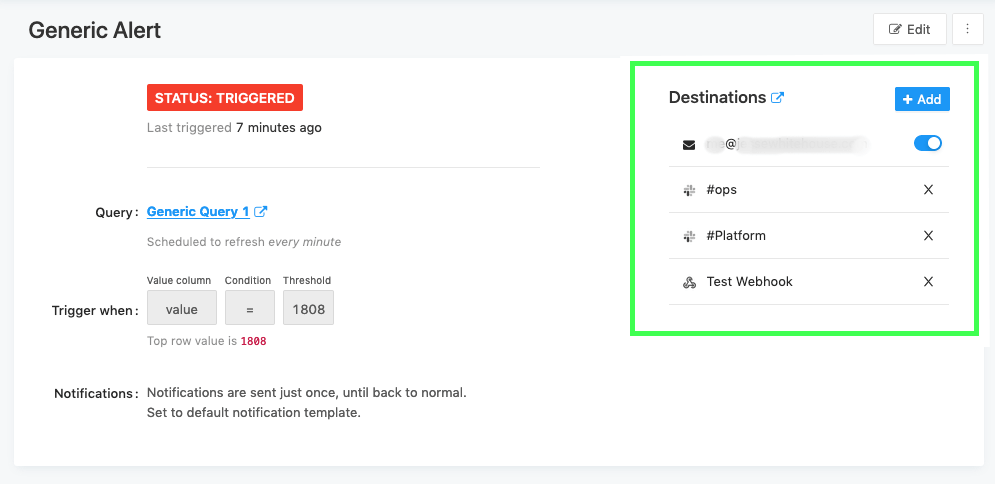
Save your alert. After you do this, you can add an alert destination. If you skip this step you will not be notified when the alert is triggered.
Alert Status & Frequency
The status of your Alert criteria is checked every time the query is executed. Alerts have three possible statuses:
TRIGGEREDmeans that your query matched the criteria defined in your alert configuration. If you set your alert to trigger when the value of "cats" is greater than 1500 as long as it's above 1500 your alert is triggered.OKmeans that the most recent query execution did not match the criteria defined in your alert. This doesn't mean that the Alert has not been triggered previously. If your "cats" value is now 1470 your alert will show as OK.UNKNOWNmeans Fanar does not have enough data to evaluate the alert criteria. You should see this status immediately after creating your Alert until the query has executed. The Alert will also show this status if there was no data in the query result or if the most recent query result doesn't have the configured Value Column.
Fanar sends notifications to your chosen Alert Destinations whenever it detects that the Alert status has changed from OK to TRIGGERED or vice versa. Consider this example where an Alert is configured on a query that is scheduled to run once daily. The daily status of the Alert appears in the table below. Prior to Monday the alert status was OK.
| Day | Alert Status |
|---|---|
| Monday | OK |
| Tuesday | OK |
| Wednesday | TRIGGERED |
| Thursday | TRIGGERED |
| Friday | TRIGGERED |
| Saturday | TRIGGERED |
| Sunday | OK |
By default, Fanar would send a notification on Wednesday when the status changed from OK to TRIGGERED and again on Sunday when it switches back. It will not send alerts on Thursday, Friday, or Saturday unless you specifically configure it to do so because the Alert status did not change between executions on those days.
Setting Rearm Seconds for an Alert
To send notifications more frequently, set the Rearm seconds to any nonzero value. This tells Fanar to treat a TRIGGERED status after the chosen number of seconds as though the status has changed and therefore send a notification.
For example, if the above Alert were configured with Rearm seconds equal to 1 a notification would be sent every day that the status was TRIGGERED (Wednesday - Saturday) and one on Sunday when the status changed back to OK.
Alert notifications are directly tied to the query executions. If a query is scheduled to execute once per week, and is not executed manually by a Fanar user, then you will receive one notification per week at most, regardless of the configured Rearm seconds.
Query execution schedule and Rearm seconds
The Rearm seconds interval and query schedule are inversely related. If the interval between query executions is shorter, your Rearm seconds value will usually be higher to prevent excessive notifications. If your query only executes once per week, then any Rearm seconds that is shorter than the query execution interval will behave the same way. Most users just use 1 in this case.
For a query that executes every 24 hours, any Rearm seconds value between 1 and 86,400 will have the same effect: a notification will be sent every day if the Alert status is TRIGGERED.
Imagine you set an Alert on a query that executes every fifteen minutes. You have configured Rearm seconds equal to 3600 (one hour). This guarantees that you will receive a status notification once an hour if the status is TRIGGERED. But you will also receive a notification if the status changes. The one hour rearm prevents Fanar from sending you a notification every fifteen minutes while the Alert is triggered. So in the below time-line:
| Time | Alert Status |
|---|---|
| 8:00 AM | OK |
| 8:15 AM | OK |
| 8:30 AM | TRIGGERED |
| 8:45 AM | TRIGGERED |
| 9:00 AM | TRIGGERED |
| 9:15 AM | TRIGGERED |
| 9:30 AM | TRIGGERED |
| 9:45 AM | OK |
| 10:00 AM | TRIGGERED |
You would receive the following notifications:
| Alert Time | Alert Message | Reason |
|---|---|---|
| 8:30 AM | Status is TRIGGERED | Status changed |
| 9:30 AM | Status is TRIGGERED | Alert was rearmed |
| 9:45 AM | Status is OK | Status changed |
| 10:00 AM | Status is TRIGGERED | Status changed |
Importantly, assuming the alert was not triggered at all during the nine o'clock hour, the next alert would not arrive until 9:55 AM, the next scheduled query execution after the Rearm seconds was completed.